

The readout on the shell is the part of a power bank a shopper reads before anything else, and the two common types do not promise the same thing. A four-dot LED bar says roughly how much is left. A percentage LCD says exactly how much is left, in a number the buyer will compare against the rated capacity printed on the box. Choose the wrong one for the tier and the return reason becomes a mismatch between what the screen showed and what the shopper expected, not a fault in the cell. What follows is how to choose LED display power bank readouts, tier by tier, against a percentage model.
Two Readouts, Two Promises: LED Level Bars vs LCD Percentage
A level bar is a coarse instrument and it is honest about being one. Four dots divide the pack into quarters, so the display resolves to about 25 percent per step and a user learns to read it as a range rather than a value. The advantage is that nobody argues with it: a pack showing two dots is neither wrong nor right, it is simply somewhere in the middle of its range.
A percentage LCD is a fine instrument and it invites arithmetic. A shopper who sees 8 percent left on a 10,000 mAh pack will calculate how many charges that buys for a phone with a 4,000 mAh cell, and the answer will be less than one. That is correct behaviour from a battery, and it is also the single most common complaint on a percentage-display product, because the number was read as a promise of full charges rather than a state of charge.
The decision therefore depends on who reads the display:
- Gift and promotional buyers order the bar. It photographs well, it needs no explanation on a carton, and it cannot produce a complaint about an exact figure.
- Retail and electronics channels increasingly ask for the percentage. It reads as a higher tier on a shelf, and shoppers in that channel already own devices that show percentages.
- Desktop and multi-port units justify the LCD because the pack is used for several devices and the user needs to plan, not just glance.
One rule that avoids most complaints after the first shipment: never mix the two on the same shelf position. A percentage model next to a bar model at the same capacity invites the shopper to compare the readouts rather than the packs.
What the Number Counts: Rated Capacity, Cell Capacity and Usable Output
Three different numbers get called capacity, and the display relates to only one of them.
Cell capacity is what the cells hold, measured at the cell voltage of about 3.7 V. This is the number printed on the shell and in the listing, and it is the number the industry quotes.
Rated capacity in the strict sense is the same figure expressed consistently, which is why a 10,000 mAh pack is a 10,000 mAh pack regardless of how many cells it uses.
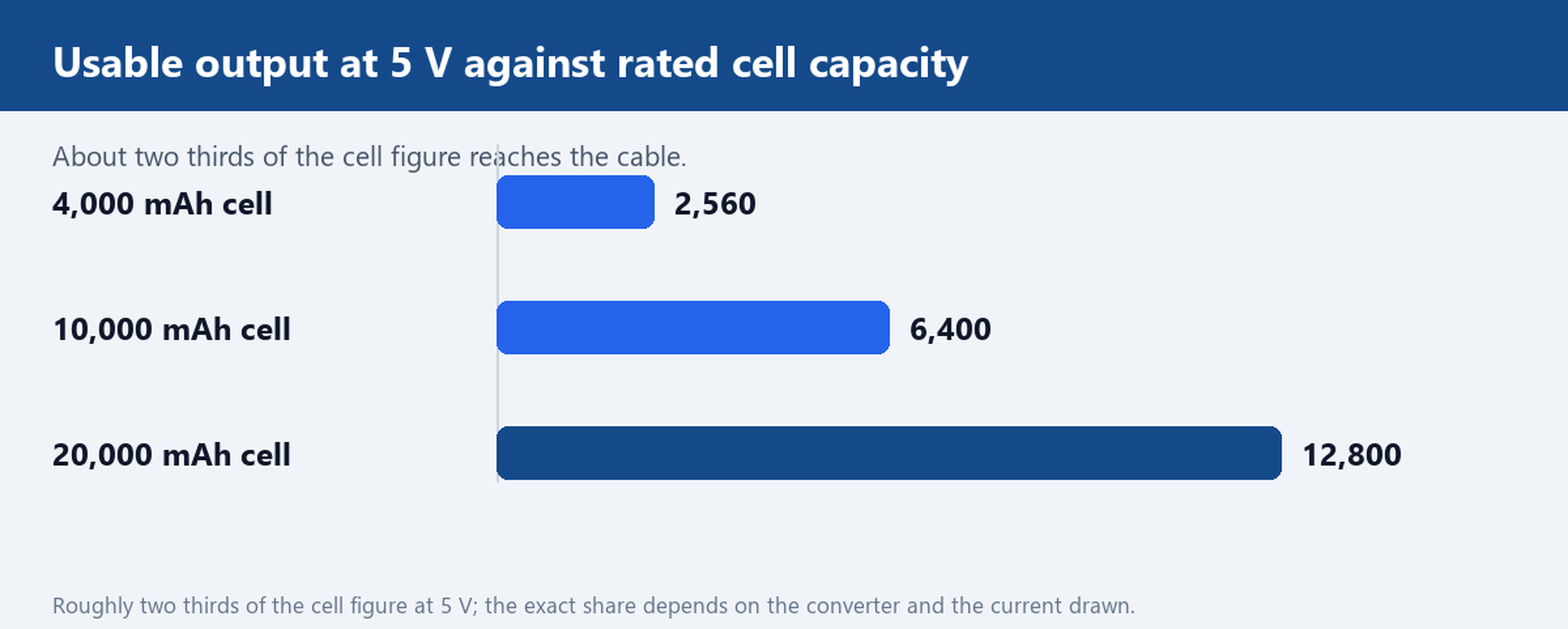
Usable output is what arrives at the phone, measured at 5 V after the boost converter. Conversion loss and the cut-off voltage take a share, so a pack delivers noticeably less at 5 V than its cell figure suggests. A working rule for a 5 V output is that roughly two thirds of the cell figure reaches the cable, and the exact share depends on the converter and the current drawn.
This is where display expectations go wrong. A percentage readout tracks the cell, not the cable. When it shows 20 percent, the pack still has 20 percent of its cell energy, but the phone in the user hands may only gain a fraction of a charge from it. Write that relationship into the listing copy and into the manual, and the number stops being a complaint.
Testing Display Accuracy on Arrival Samples
A sample unit is worth testing on three points before a purchase order is confirmed, and all three need a load rather than a look.
- Step behaviour. Discharge the pack into a fixed load and record where the readout changes. A bar should step at even intervals; a percentage should fall smoothly rather than jumping from 40 to 25 in one movement.
- The last stretch. Watch the final 10 percent. Packs that collapse from 10 percent to shutdown in a minute are common, and the readout is what the user blames. A pack that holds a usable output down to a low reading is a better product even at the same cell.
- Recovery after charging. Charge to full, leave the pack for an hour, then read the display again. A pack that shows 100 percent and then drops to 88 percent on the first unplug is reporting a charge termination problem, not a display problem.
Record the numbers, keep the sample, and compare the next shipment against it. Display drift between batches is a real failure mode and it is invisible without a baseline.
Sizing the Readout to the Shell: a 95 g Card Unit Against a 245 g Desktop Body
The readout has to fit the shell, and the shell follows the capacity tier.
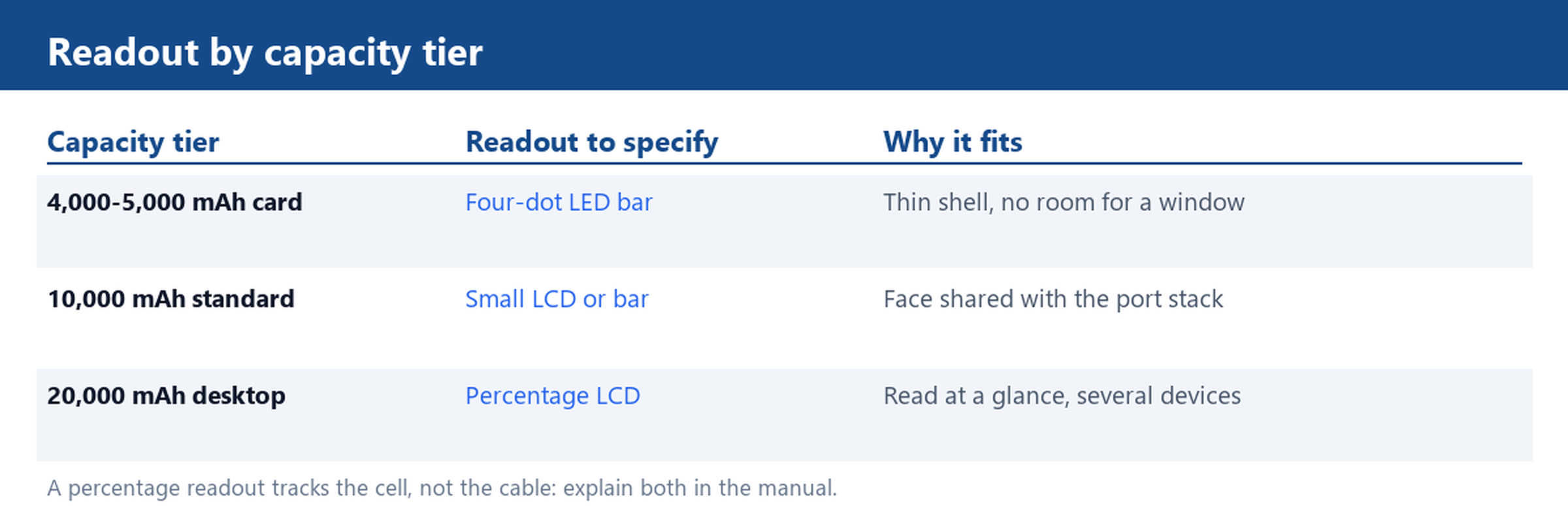
A card-format unit around 95 g carries 4,000 to 5,000 mAh and has room for four small LEDs behind a window and almost nothing else. Trying to fit an LCD into that body costs thickness, which is the one property the format exists to deliver. A bar is the correct readout here, and a four-dot bar is enough.
A desktop body around 245 g carries 20,000 mAh and has a face wide enough for a percentage display, a port legend and a button that does not need a fingernail. The unit sits on a desk, so the display is read at a glance from a metre away, which is exactly what a percentage is good for and what four small dots are not.
Between the two, a 10,000 mAh body is the difficult case. There is room for a small LCD, and the channel will usually ask for one, but the display competes with the port stack for the same face. Confirm the layout on a drawing before tooling, and confirm that the display window does not sit over a port that a cable plug will cover.
Ordering Notes: Which Readout Belongs in Which Retail Tier
Four notes that shorten the quotation cycle.
- Fix the readout before the shell colour. Colour changes are cheap and late; a display change is a new window, a new light pipe and a new test routine.
- Ask for the display behaviour in writing. Step size for a bar, update interval for a percentage, and what the display shows during charging and at cut-off.
- Check the low-current behaviour. A percentage display that draws enough to flatten the pack in storage is a warehouse problem, not a retail one.
- Match the readout to the documentation. If the manual explains usable output at 5 V, a percentage readout is supportable. If the manual only repeats the cell figure, ship the bar.
The capacity tiers themselves are a separate decision, and the 1,000 to 5,000 mAh range and the 10,001 to 20,000 mAh range are the two that carry most of this question. The mini power bank range shows how a bar readout is handled on the smallest shells, the multi-port range shows the LCD treatment on a wider face, and the card power bank is the reference for the 95 g format described above. All of them sit inside power banks by type, where the two readouts can be compared side by side on the same page.
Send the capacity tier and shell format you are buying, and we will quote the LED-level and LCD-percentage versions side by side.