

A laptop power bank for a power outage is judged by two numbers that most listings bury: the inverter rating and the recharge input. Everything else follows from them. The first thing an outage takes out is not the phone, but the router that the household notices within ten minutes, and then the laptop with the unfinished work on it. A 150 W outlet with a 15,000 mAh cell covers both without hunting for a DC tip that fits, and it is nowhere near enough for a kettle. Knowing where that line falls is the whole decision.
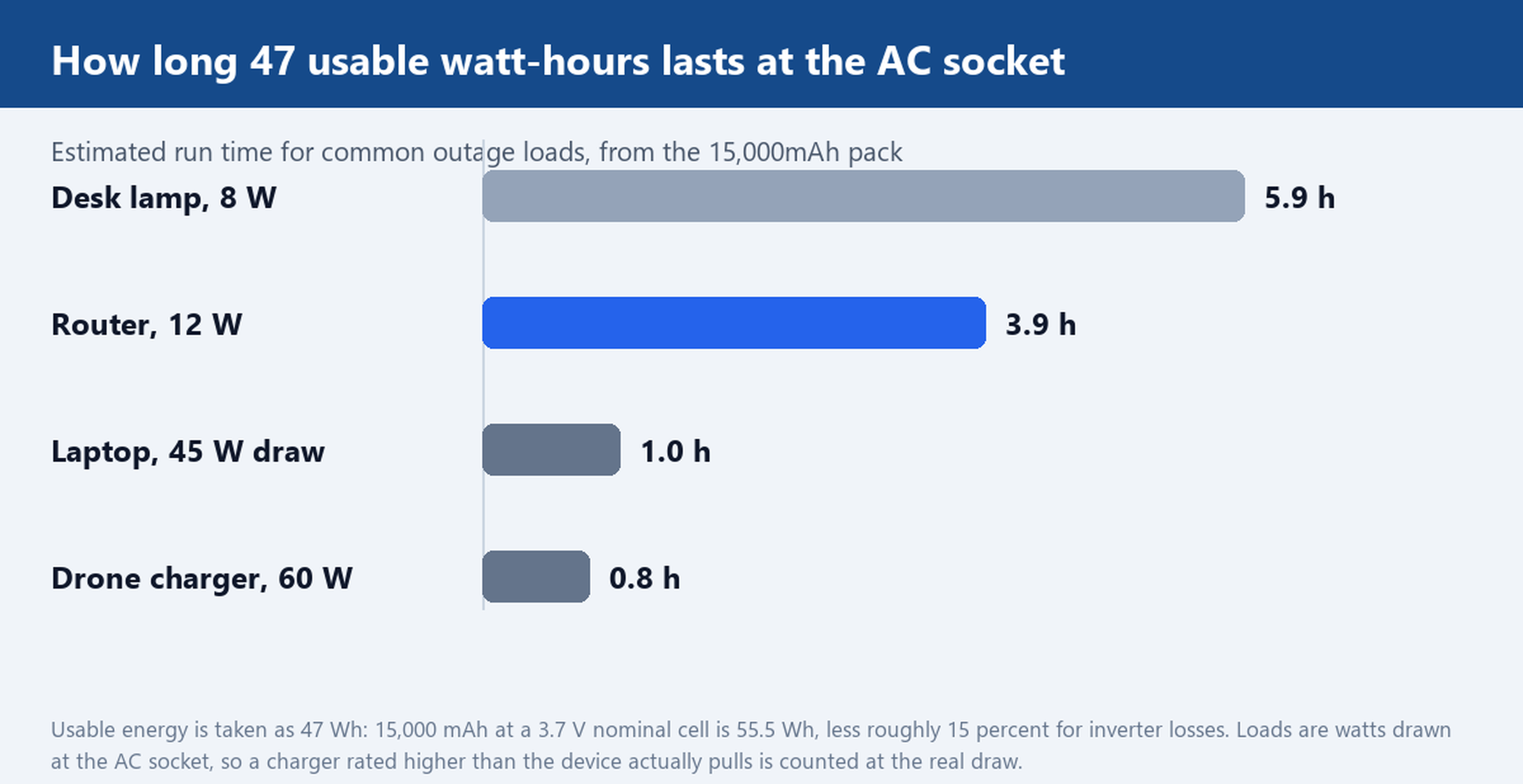
What an outage actually asks for: router first, laptop second, and the AC socket in between
Rank the loads before buying anything. A home router pulls roughly 12 W, a LED desk lamp under 10 W, a phone under 20 W, and a laptop somewhere between 35 W and 45 W in ordinary office use. Those four together sit near 90 W, which is inside a 150 W outlet with room to spare, and they are also the loads that matter for the first four hours of an outage.
The AC socket is what makes that list practical. An original laptop brick plugs straight in, with no tip matching and no voltage guessing, and the same socket runs a camera charger or a desk lamp that was never designed to accept USB power. The alternative, a DC barrel port at a fixed voltage, is more efficient but only serves devices whose plug and voltage agree with it.
Efficiency is the reason to know both paths. DC to DC conversion loses very little, while an AC outlet runs an inverter that turns stored DC into mains-shaped AC and loses something on the way; treat the inverter as roughly 85 percent efficient when planning. So when a device has a 12 V or 19 V input that matches one of the DC ports, use that port and keep the inverter for the devices that have no alternative.
150 W of AC inside a 180 × 90 × 40 mm body: which devices fit and which trip it
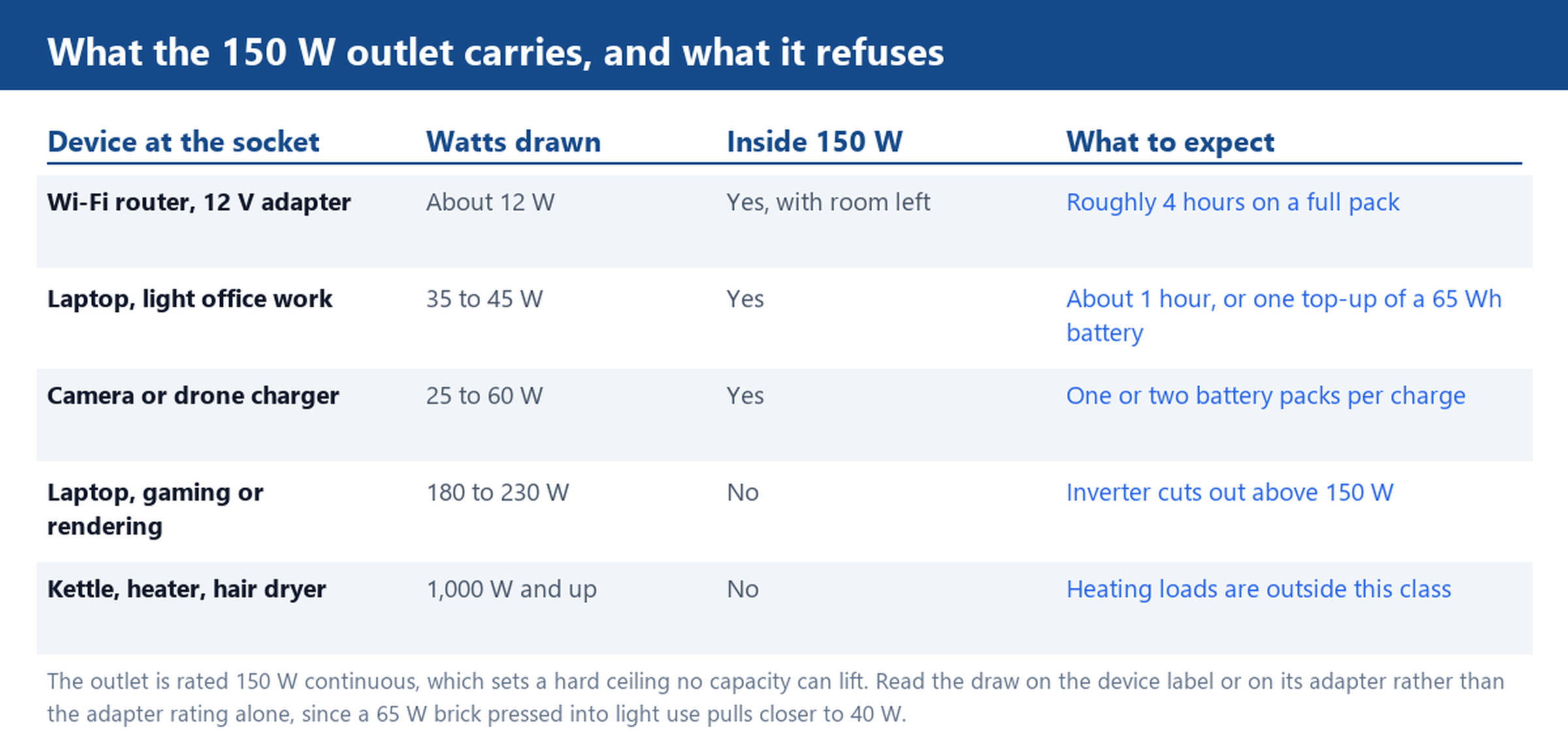
The table above is the entire decision in one place. What matters is the continuous rating, not the capacity: 150 W is a ceiling on what can be drawn at any instant, and no amount of stored energy raises it. Two loads running together have to be added, not rotated. A router at 12 W plus a laptop at 45 W is 57 W and comfortable; the same pair plus a small heater is a shutdown.
Inrush is the trap that the arithmetic misses. Motors and anything with a heating element pull several times their running current for a fraction of a second at switch-on, and an inverter protects itself by cutting out rather than riding through. A fridge compressor, a drill or a pump can therefore trip a 150 W outlet even when its label says 120 W. If a device hums, stalls and then dies, that is the inverter doing its job, not a fault in the pack.
The body dimensions are worth a thought too, because they set what the pack is. At 180 × 90 × 40 mm and about 600 g it fits a laptop bag and a drawer, which is the point: this is an emergency pack that lives near the router, not a wheeled power station that lives in a garage.
15,000 mAh against a 15 V 1 A input: recharge time is the real ceiling
Capacity translates into watt-hours before it means anything. At a 3.7 V nominal cell, 15,000 mAh is 55.5 Wh, and after inverter losses the usable figure is closer to 47 Wh. That is the number to divide by the load.
Divided by a 12 W router it gives roughly four hours of uptime. Divided by a 45 W laptop it gives about one hour, which is one working session or one top-up of a 65 Wh laptop battery, not a full day. A phone, at 20 W or less, gets through several charges. This is why the priority order matters: the same pack that runs a router all evening runs a laptop for an afternoon.
Recharging is the other ceiling, and it is the one people discover late. The input on this build is 15 V at 1 A, so 15 W going in. Fifty-five watt-hours into a 15 W input is under four hours at perfect efficiency, and with charging losses the realistic window is closer to five. A 15 V 1 A input is a dedicated DC jack fed by its own charger, not a phone-style USB port, so plan the recharge around a mains socket rather than assuming any cable in the drawer will do.
In a multi-day outage that changes the plan. One full pack covers an evening of router and one laptop session, and the next morning is spent recharging rather than working. If two days is the realistic horizon, two packs that take turns beat one larger pack, because the constraint is the input rate rather than the stored energy.
Running a device while the pack recharges, and the 12 V jump-start circuit in the same case
Pass-through charging, where the pack supplies a device while its own input is connected, is convenient and worth confirming on the exact build you order rather than assuming. Where it is supported, the order of operations is simple: connect the input first, let the pack register the charge, then connect the load. Where it is not, run the load down first and charge afterwards, because a pack that is charging and discharging at once will simply take longer to reach full.
The jump-start circuit is the part that surprises buyers. This build carries a 400 A start rating with a 750 A peak, which is enough to crank a car with a flat battery through the supplied clamps. Read the two numbers correctly: the peak figure is a short burst, the start figure is what the motor actually sees. Neither turns the pack into a battery replacement, and neither helps much in deep cold, where a tired battery needs more current than any portable pack will give.
The port set also allows a small trick worth knowing. Many routers and ONT boxes take 12 V directly, and this pack has a 12 V 2 A DC output. Running the router from that port instead of through the AC socket skips the inverter, which on a 12 W load is the difference between roughly four hours and closer to five.
Storing it between outages: charge level, temperature and the 1,000-cycle cell
An emergency pack spends most of its life doing nothing, and how it is stored decides whether it works on the night it is needed.
Charge is the first factor. Storing a lithium pack at full charge for months accelerates the loss of capacity, and storing it flat risks a cell that will not wake up. Roughly half charge is the usual compromise, topped up every three months and checked on the same calendar reminder as the smoke alarm.
Temperature is the second. A car glovebox in summer is the worst place for any lithium pack, and a shelf in a closed room near a window is not much better. The storage location should be dry, out of direct sun, and away from the router it is meant to back up, so a single failure does not take out both.
The third is cycle life. This build is rated for 1,000 cycles on a lithium polymer cell, and cycle ratings are normally quoted to the point where a pack holds about 80 percent of its original capacity. Partial top-ups count fractionally rather than as whole cycles, so an emergency pack that is used twice a year and topped up quarterly will never approach that number; the calendar, not the counter, is what ages it.
Start from the loads, not the capacity. Add up the watts the household needs for the first four hours, check that the total stays under the inverter rating, then buy the recharge window that fits the outage length you actually expect. Tell us which devices have to stay on and for how many hours, and we will match a pack from the laptop and tablet range, confirm the port set for those devices, and quote a sample for your own test. Packs for shorter outages sit in the 10,001 to 20,000 mAh group, vehicle starting is covered in the jump starter line, the use-case collections group the same builds by scenario, and logo, plug standard and port mix are handled through the customisation service.